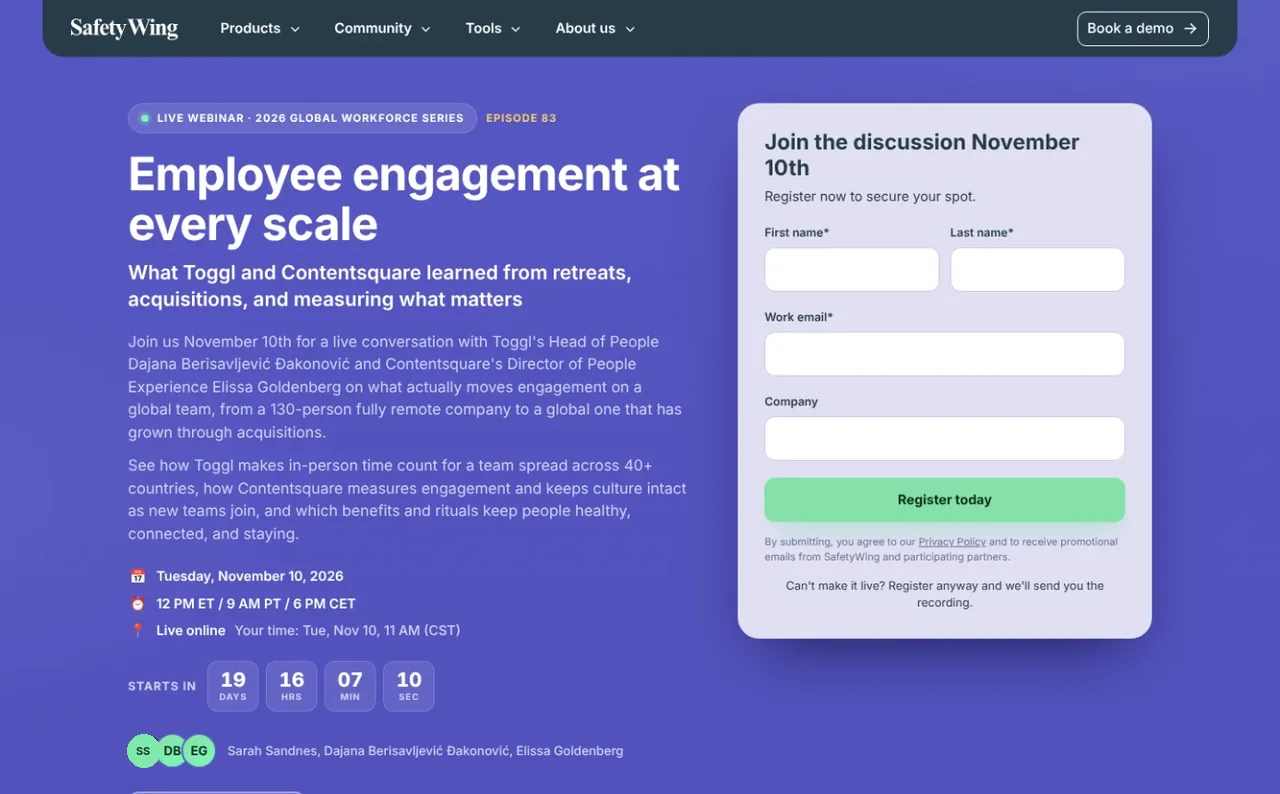
Stream your webinars live from your own website, where you want customers to go anyway. It costs nothing to run (YouTube Live is free), it is faster for attendees, and you control every pixel. The page switches from registration to countdown to live to replay on its own, every session grows your YouTube following, and the embedded recording keeps working for your SEO.
Webinars that run on your own website
1Page per session, every state
FreeStreaming with YouTube Live, no platform license
4States: register, countdown, live, replay
A real build: SafetyWing
One page on their own site. Seven states. Zero webinar licenses.
webinar.safetywing.com
Weeks before
Registration
A registration page on their own site: topic, speakers, a countdown and the form. Every sign-up goes straight to their CRM.
Same URL the whole time. Built and run by us for SafetyWing.
One page per session: registration, countdown, live and replay
YouTube Live or StreamYard embed, with simulcast
Q&A, polls, comments and calls to action around the video
Registration form connected to your CRM, with calendar invites
Event and video schema so sessions show up in search
A moderator view for questions and poll results
Ways to build it
01 / BUILD AND HAND OFF
We build it on your site and train your team to run every session on it.
02 / BUILD AND MAINTAIN
We keep the setup working (embeds, forms, page states, CRM sync). Your team runs the webinars.
03 / BUILD AND OPERATE
We run your webinars on it every month: topics, panelists, promotion, a moderator, replay and follow-up.
Why run webinars on your own site
01
No platform license
Stream with YouTube Live for free, or StreamYard if you want a studio. Zoom and other webinar tools come out of the budget.
02
Time on your site
Every registrant, early arrival and replay viewer spends real time on your pages. That engagement helps your search authority.
03
Your YouTube grows too
Each session lives on YouTube as well, and you can simulcast to LinkedIn and other channels at the same time.
04
Your offers, your data
The calls to action, the branding and the registrant data are yours, not a vendor's page with their logo on it.
How it gets built
01 / REGISTRATION
Before the event the page is a registration page on your own site, with your form connected to your CRM and a calendar invite for every registrant.
02 / COUNTDOWN
On the day it becomes a countdown, so people who show up early stay on your site, not a vendor's waiting room.
03 / LIVE
The stream plays on the same page. Q&A, comments, polls and your offers sit around the video, and a moderator view collects the questions.
04 / REPLAY
When it ends, the recording posts on the page automatically, with the transcript, and keeps collecting registrations and search traffic.
After launch
We set up each new session, run the live room, post the replay and keep the pages, forms and embeds working. Hand it off to your team, or keep us on to maintain it or operate it; agents and programs improve with tuning and drift without it. Compare the options ↓
We pick tools for fit, not commission. Some partner links may earn Hacking Demand a commission at no extra cost to you.
Webinars that run on your own website FAQ
Good questions. Straight answers.
What is a headless webinar?
A webinar with no platform: it runs on your own website instead of a vendor's pages. The live stream (YouTube Live or StreamYard) is embedded on your page, and you control everything around it: the registration form, the countdown, the Q&A, polls, offers and the replay.
Do we still need Zoom or a webinar tool?
No. YouTube Live is free, and StreamYard is a low-cost studio if you want overlays, guests and branding. The registration, reminders and follow-up run through your own site and CRM.
Is YouTube Live better for SEO?
It helps twice: the session builds your YouTube channel, and the page on your site holds the video, the transcript and the event schema. Visitors spend time on your site instead of a vendor's.
Can people ask questions during the live session?
Yes. A question box sits beside the video and sends questions to a moderator view. Questions are not shown to other attendees, which keeps the room clean and protects privacy.
Does it connect to HubSpot?
Yes. Registrations go to your HubSpot form, so contacts, lists, workflows and reporting work as they do for any other form. It works with other CRMs too.
What does the webinars that run on your own website do?
Stream your webinars live from your own website, where you want customers to go anyway. It costs nothing to run (YouTube Live is free), it is faster for attendees, and you control every pixel. The page switches from registration to countdown to live to replay on its own, every session grows your YouTube following, and the embedded recording keeps working for your SEO. It covers: one page per session: registration, countdown, live and replay; youtube live or streamyard embed, with simulcast; q&a, polls, comments and calls to action around the video; registration form connected to your crm, with calendar invites; event and video schema so sessions show up in search; a moderator view for questions and poll results.
Do I need HubSpot for the webinars that run on your own website?
No. We build it on HubSpot when you run HubSpot, using what HubSpot does well (such as Breeze), or as a custom build on your own stack, so it also works with Salesforce, another CRM, or no CRM yet.
What happens after the webinars that run on your own website goes live?
We set up each new session, run the live room, post the replay and keep the pages, forms and embeds working. You choose: build and hand off to your team, build and maintain (we keep it tuned and working), or build and operate (our experts run the work it powers).
Who runs it?
Build it. Maintain it. Or have us operate it.
Every build ends with a choice. Agents and programs improve with tuning and drift without it, so we recommend an ongoing option: we keep it working, or our experts run the work it powers.
01YOUR TEAM RUNS IT
Build and hand off
We build it into your site and train your team to run every session on it: scheduling the stream, setting up each session page and moderating the room.
Design and build
Testing and documentation
Handoff and training
02RecommendedWE KEEP IT WORKING
Build and maintain
We keep it working: embeds, forms, page states, calendar invites and CRM sync, updated when YouTube, StreamYard or HubSpot change. Your team runs the webinars.