How to Create Your First Duo Copilot Agent in Amplemarket
How to create a Duo Copilot agent in Amplemarket in four steps, signal, filters, distribution and output, with real screenshots and the agent to build first.
Some links in this post are partner links. Hacking Demand may earn a commission if you sign up, at no extra cost to you. It never changes what we recommend.
TL;DR: A Duo Copilot agent in Amplemarket is built in four steps. Pick the signal it tracks, filter who counts, choose which rep gets the leads, then decide how it writes and whether it runs on autopilot or waits for review. Start with one narrow signal, keep review on for the first two weeks, and widen it once the leads look right. Here is the walkthrough with real product screenshots, as of November 2026.
What is a Duo Copilot agent?
Amplemarket's Duo Copilot runs always-on agents that track the buying signals you choose, find the right people and prepare personalized multichannel outreach for them: email, phone and LinkedIn. It works at the person level, not just the account. Every lead arrives with who they are, the account, the signal that surfaced them and a sequence written for that person and that signal.
I build prospecting agents for a living, mostly for HubSpot teams, and Duo Copilot uses the same four-part structure I draw on a whiteboard for every client: a reason to reach out, a definition of who qualifies, an owner, and a message. Get those four right and the tool does the rest. Get them wrong and no setting will save you.
Step 1: What signal should the agent track?
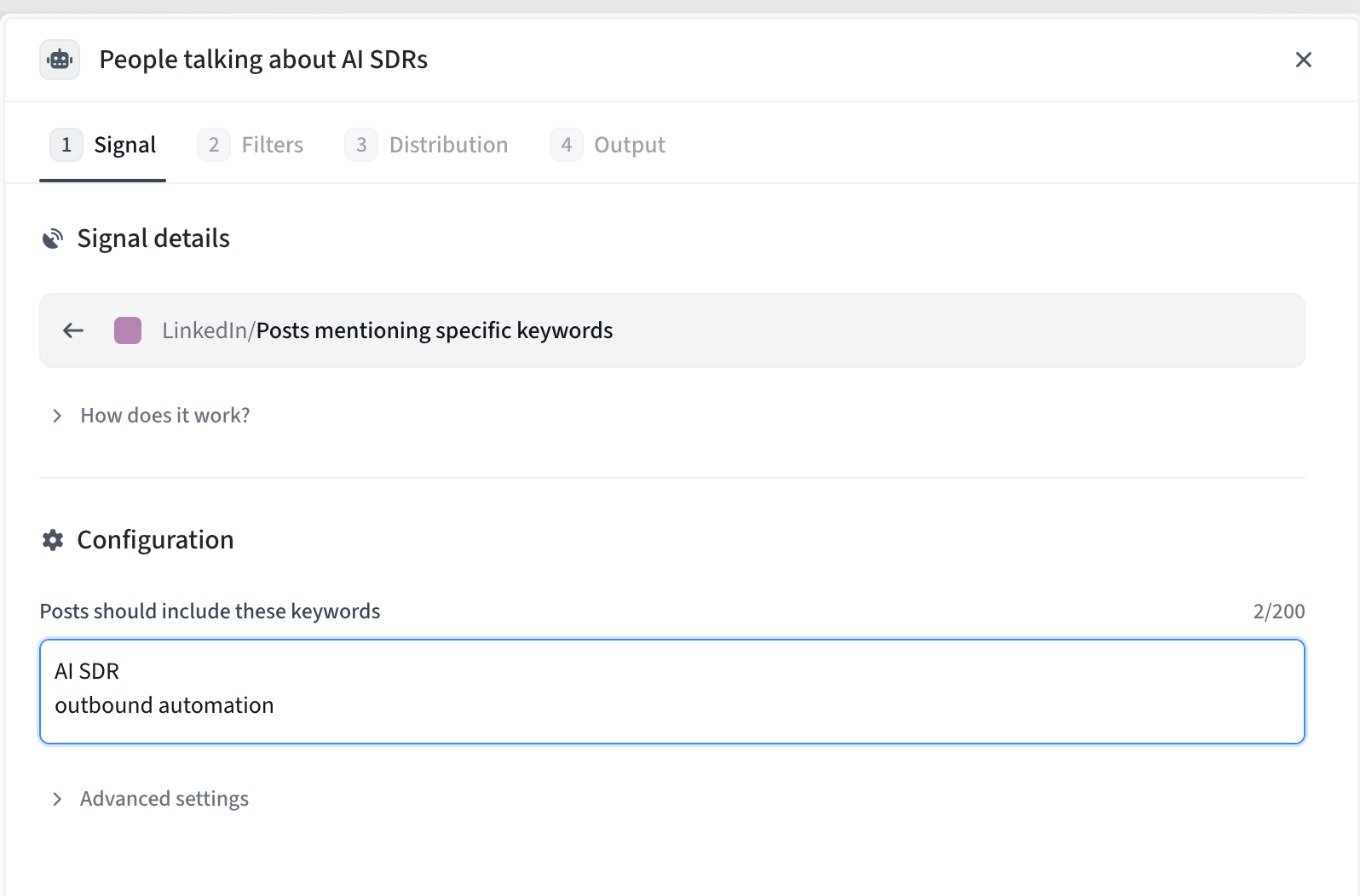
Step 1, Signal. This agent tracks posts that mention "AI SDR" or "outbound automation".
The signal is the reason to reach out now. The agent library has 24 agents to start from, grouped into build your own (a custom API source or any report or list in your CRM), LinkedIn engagement, CRM signals like closed-lost reactivation and past customer job changes, competitor G2 reviews, competitive intelligence, job changes, Slack communities, and company activity such as funding, hiring and news.
My rule for a first agent: pick the signal with the clearest "why now". Someone posting about the exact problem you solve beats a broad company event like a funding round, because the reason to talk is in their own words. Use the phrases your buyers actually write, not your category name.
Step 2: Who should count as a lead?
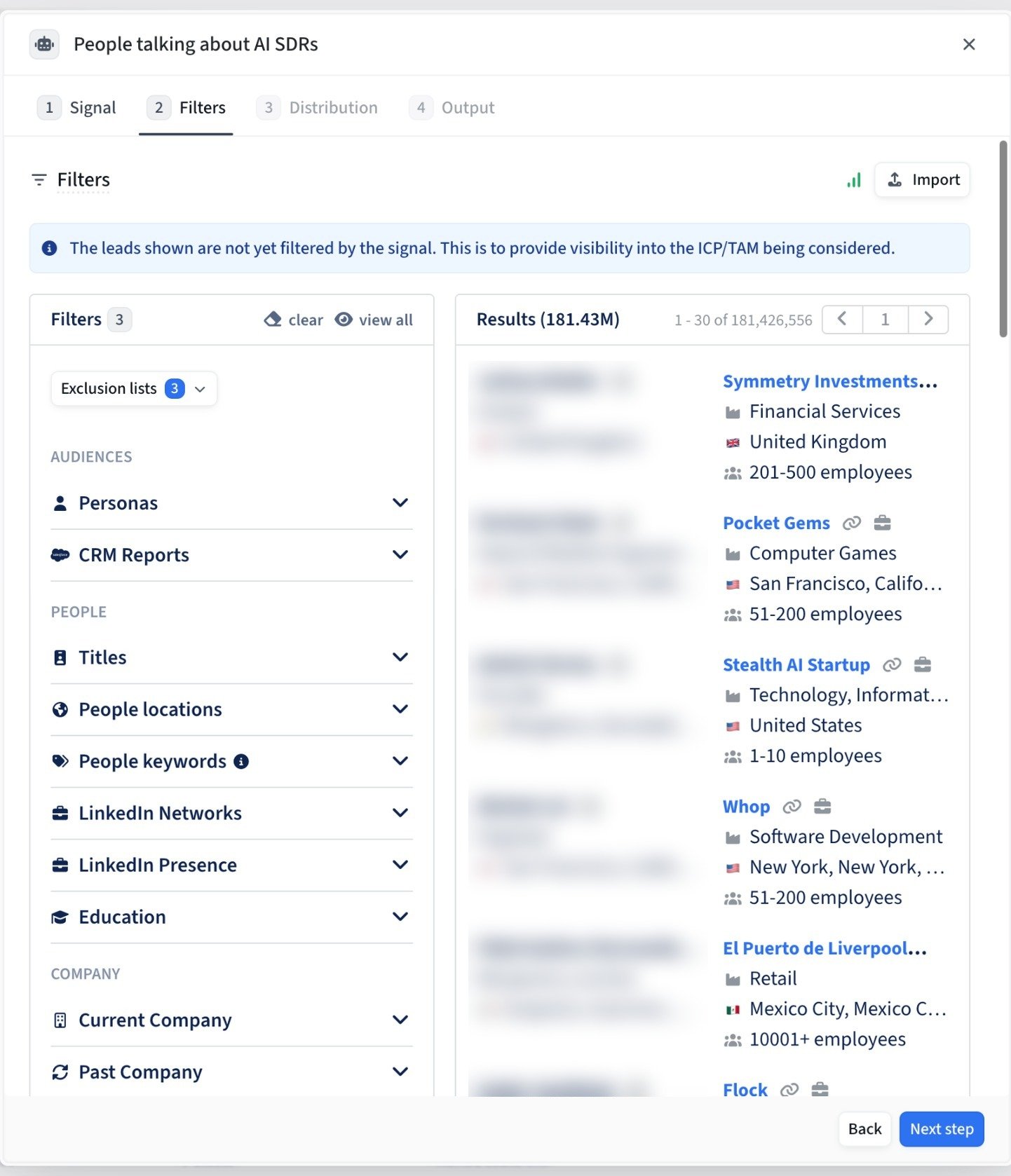
Step 2, Filters. Personas, CRM reports, people and company filters, with three exclusion lists applied. Personal data is blurred.
Filters decide who qualifies once the signal fires. You can use your saved personas and CRM reports, titles, people locations, keywords, education, and current or past company, plus exclusion lists. The results panel shows the pool your filters describe before the signal narrows it, which is the fastest way to spot filters that are too loose.
Two things I set on day one. Exclusion lists for customers, open opportunities and anyone already in a sequence. And a persona tight enough that your rep would say yes to every lead it produces. Loose filters create a queue reps learn to ignore.
Step 3: Which rep gets the leads?
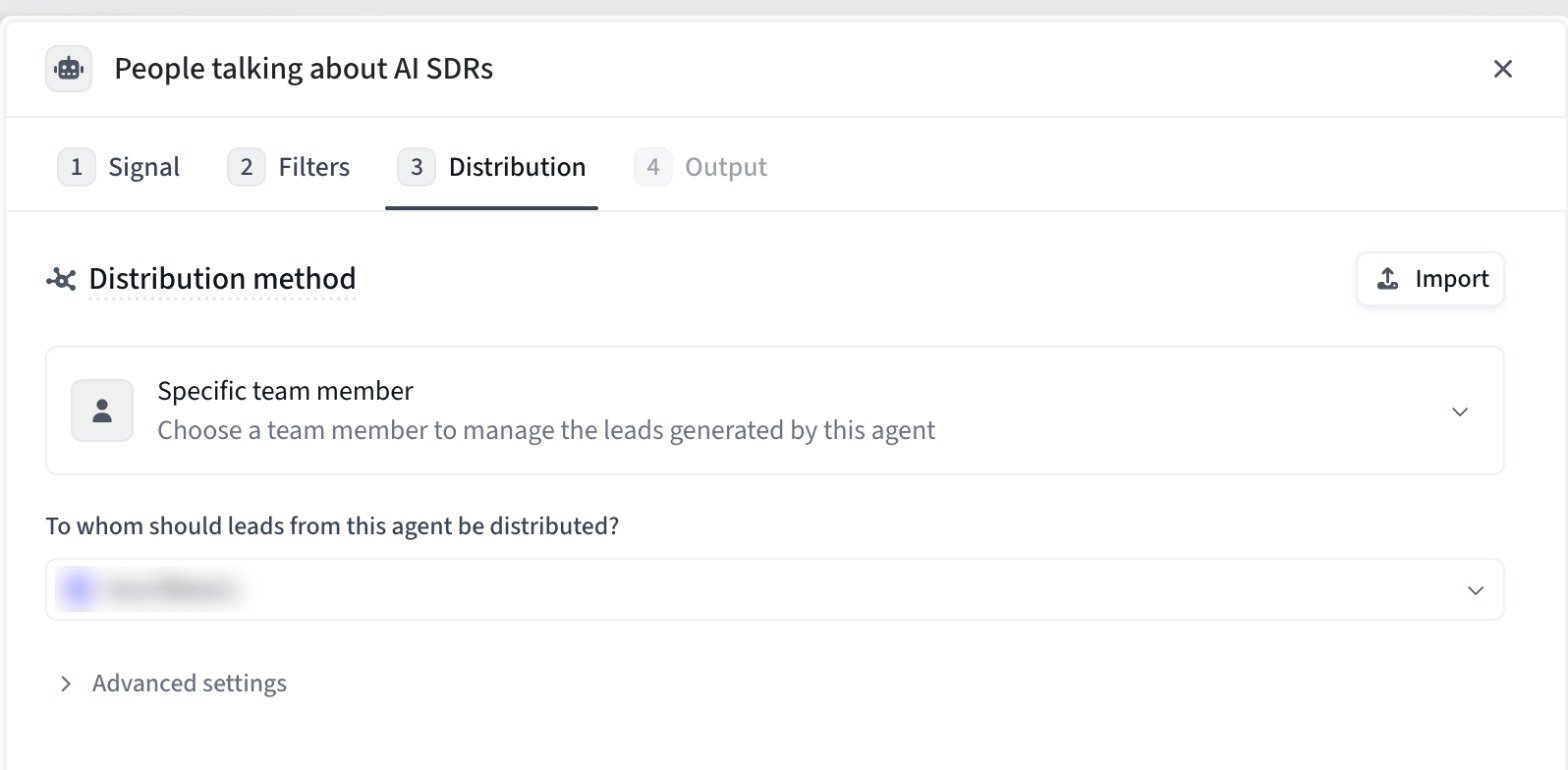
Step 3, Distribution. This agent sends every lead to one specific team member.
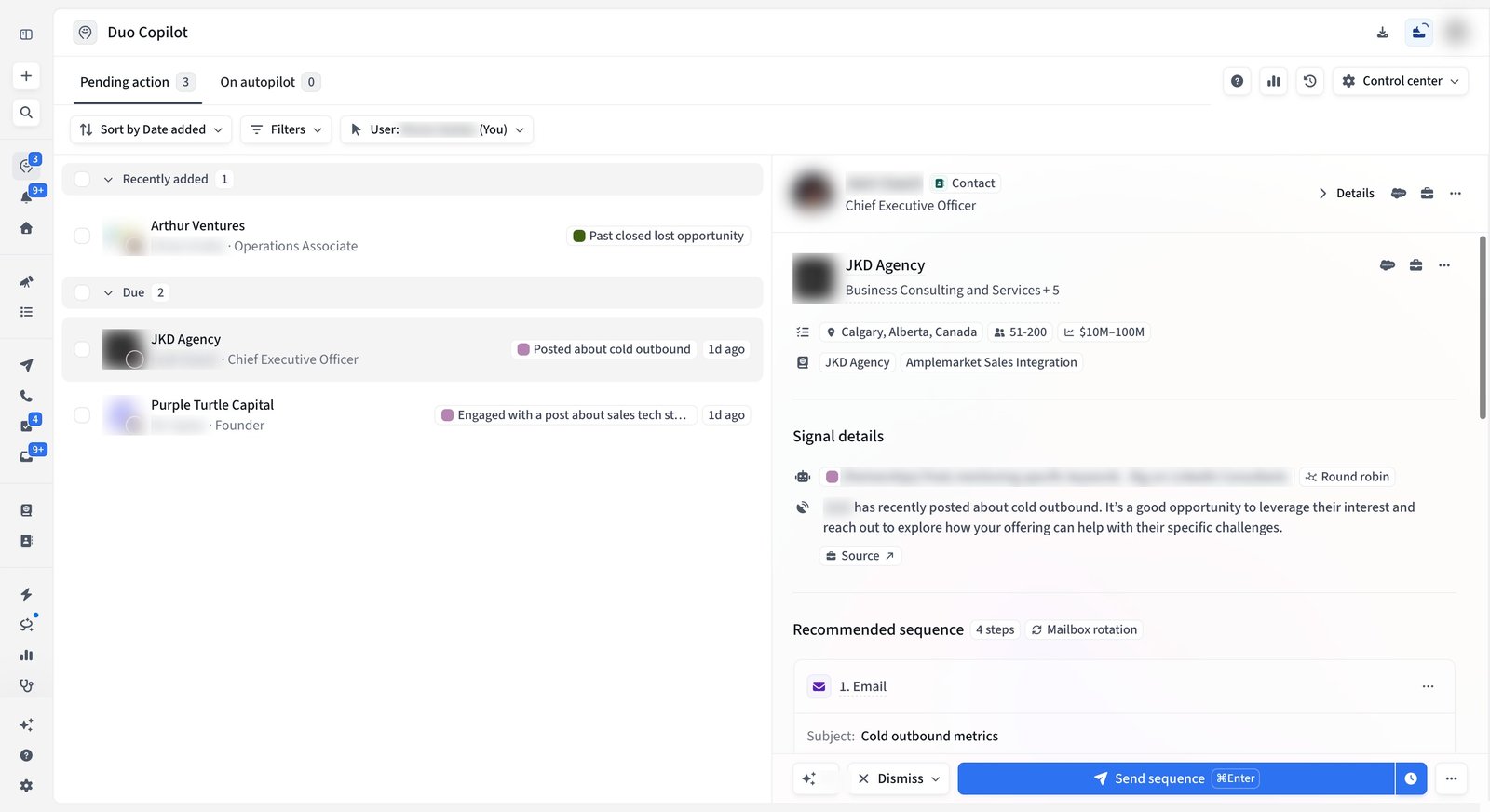
Distribution routes the leads. The example sends everything to one team member, and the lead view further down shows an agent using round robin instead. For a first agent I prefer one owner: one person reviews every lead, edits the drafts, and can tell you within a week whether the signal is worth keeping.
Step 4: How should it write, and should it run on autopilot?
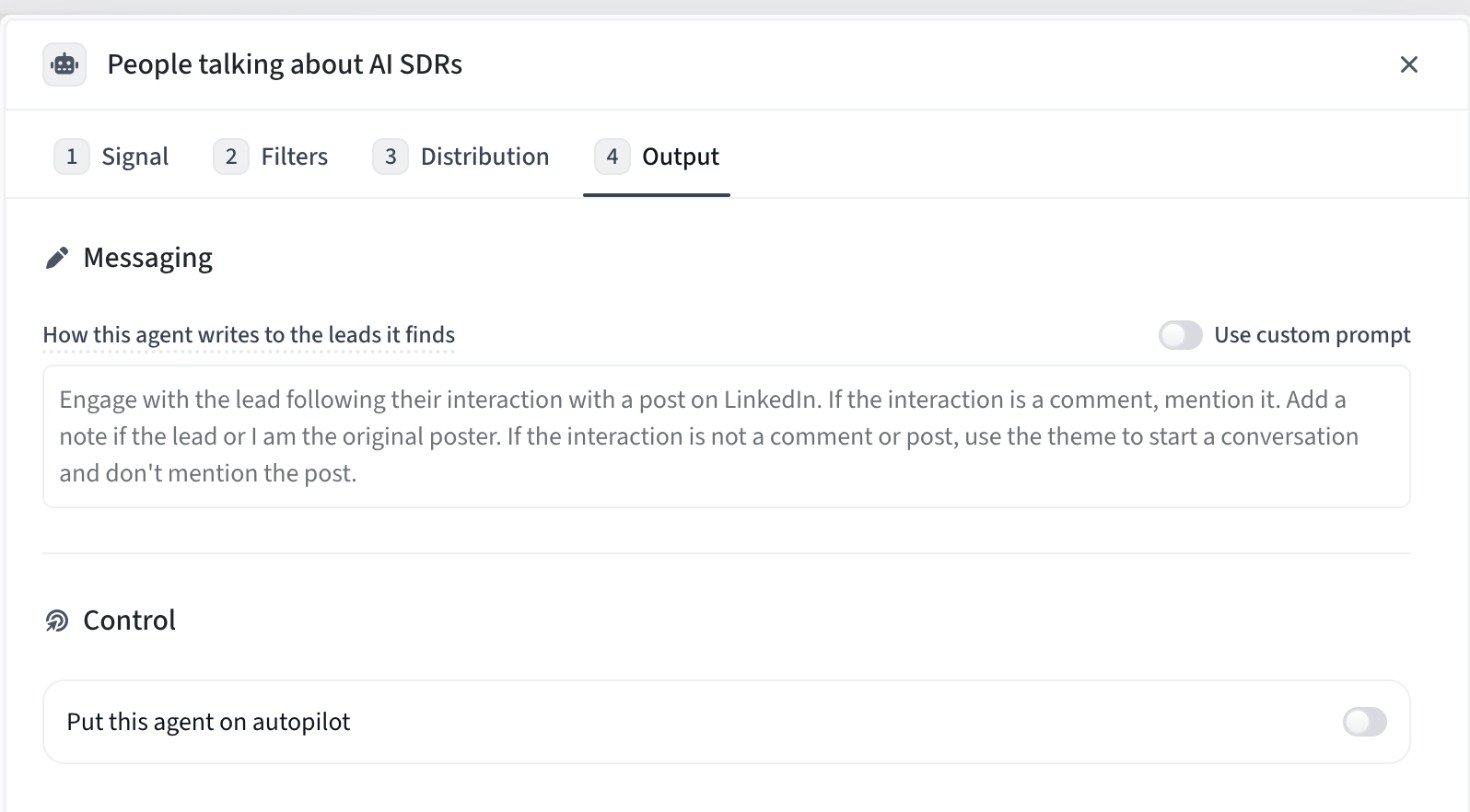
Step 4, Output. The messaging instruction, with autopilot off so a rep reviews every lead.
Output covers two decisions. First, how the agent writes to the people it finds. The default instruction for this agent references the person's interaction with the post, and you can switch on a custom prompt for your own angle. Second, control: each agent either runs on autopilot or waits for a rep to review, and it learns from what reps dismiss and edit.
Keep autopilot off at first. Two weeks of review tells you whether the signal and filters produce people you would contact anyway, and every edit your rep makes is feedback the agent learns from. Turn autopilot on only for agents whose drafts go out unedited most of the time.
What does a lead look like when it lands?
A Duo Copilot lead: the signal details, a link to the source and a recommended four-step sequence. Personal data is blurred.
Leads land in the Duo Copilot queue under Pending action, each with the signal that surfaced it, a link to the source, the company context and a recommended sequence. The rep sends it, edits it or dismisses the lead. That review loop is where the agent gets sharper.
Per Amplemarket's Duo Copilot page, teams see 100+ buying signals tracked per rep every week, a 66%+ average open rate on Duo Copilot leads, 3.2x more replies from those leads and 10h+ saved per rep each week. Those are Amplemarket's figures, not mine.
Which agent should you create first?
You sell into a problem people talk about in public: posts mentioning specific keywords, like the example above.
Your CRM is full of lost deals: closed-lost reactivation or past prospect job changes.
You have strong customer champions: past customer job changes, so you follow them to their new company.
Pick one, run it with review for two weeks, then add the next. If you want help designing the signals, filters and messaging, that is the work behind our AI prospecting agent builds: we build and tune the system, your reps work the leads. Our Amplemarket review covers where the platform fits overall.
Frequently asked questions
Does a Duo Copilot agent send emails on its own?
Only if you put it on autopilot. Otherwise it prepares the outreach and waits for a rep to review, edit or dismiss each lead.
What signals can a Duo Copilot agent track?
The library covers job changes, closed-lost reactivation, competitor G2 reviews, engagement with competitors' or thought leaders' posts, funding, hiring, news, Slack communities and custom CRM signals, among others.
Can I control who the agent targets?
Yes. Filters use your ICP, personas, CRM reports and exclusion lists, and you can see the size of the pool before the signal narrows it.
Which channels does the outreach use?
Duo Copilot prepares multichannel outreach, email, phone and LinkedIn, in a sequence written for that person and that signal.
Next step: book a demo or start a free trial with Amplemarket and create your first Duo Copilot agent.
I'm an Amplemarket partner. Paid partnership with Amplemarket.