How the Amplemarket Parallel Dialer Works (and When to Use It)
How Amplemarket's Parallel Dialer calls up to 5 people at once, what happens when someone answers, and when to run one line instead, with product screens.
Some links in this post are partner links. Hacking Demand may earn a commission if you sign up, at no extra cost to you. It never changes what we recommend.
TL;DR: Amplemarket's Parallel Dialer runs up to 5 lines at once from your call tasks and connects you to the first real person who picks up. The other calls stop and that contact's page opens, so you have context the second they say hello. Use it for blocks of first-touch calls. Switch to one line at a time for the calls where you need to prepare. Here is how a calling block works, with screens from the product, as of November 2026.
What is a parallel dialer?
A parallel dialer calls several people at the same time and connects you to whoever answers first. The point is simple: most outbound calls ring out or hit voicemail, and a rep dialing one number at a time spends most of the block listening to ringing. Amplemarket builds this into its outbound workflow, so the calls run from the same call tasks, sequences and contact records your reps already use. Amplemarket's own explainer, what is a parallel dialer, covers the category in more depth.
Watch a calling block from start to finish
This is Amplemarket's 40-second product video of the Parallel Dialer. What I would watch for: the Parallel dialing switch on the call tasks view at the start, the moment someone picks up and their contact page is already open with the task, context and activity, the call disposition and notes after the call, and the session summary at the end.
How does a calling block work, step by step?
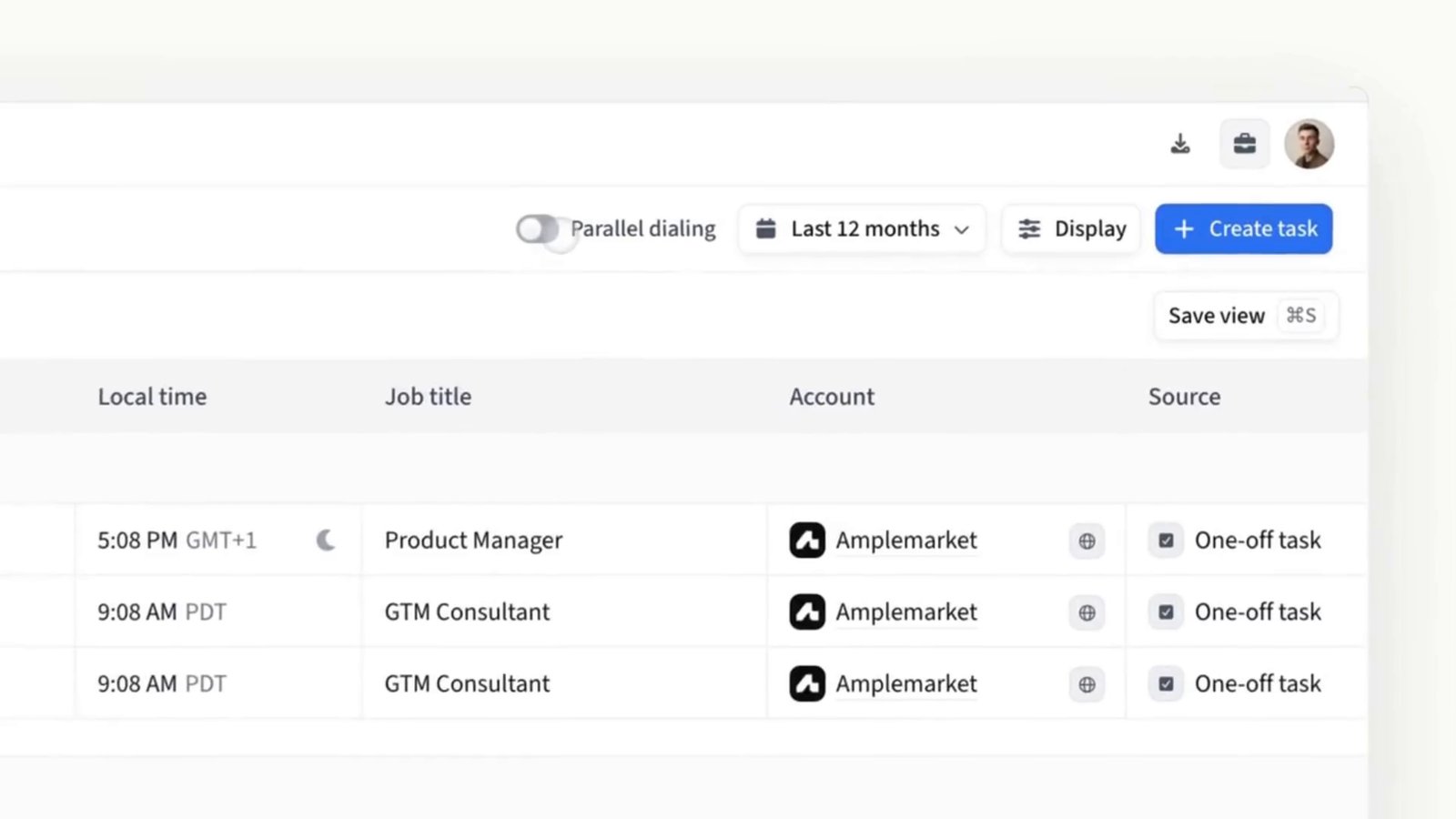
The call tasks view. The Parallel dialing switch sits at the top of the list.
Start from your call tasks. Filter the tasks to the calls you want to work through and turn on Parallel dialing. No list exports, the tasks are already in Amplemarket.
Choose your lines and start calling. You can run up to 5 lines at once. Amplemarket detects on each line whether it reached a person, a voicemail or no answer, and handles the voicemails and no-answers for you.
Talk to whoever picks up. The other calls stop automatically and that contact's page opens, so you see who they are and why you are calling before you say a word.
Log it and keep going. After the call you confirm the details, set the call disposition and notes, then log and move straight to the next set of calls.
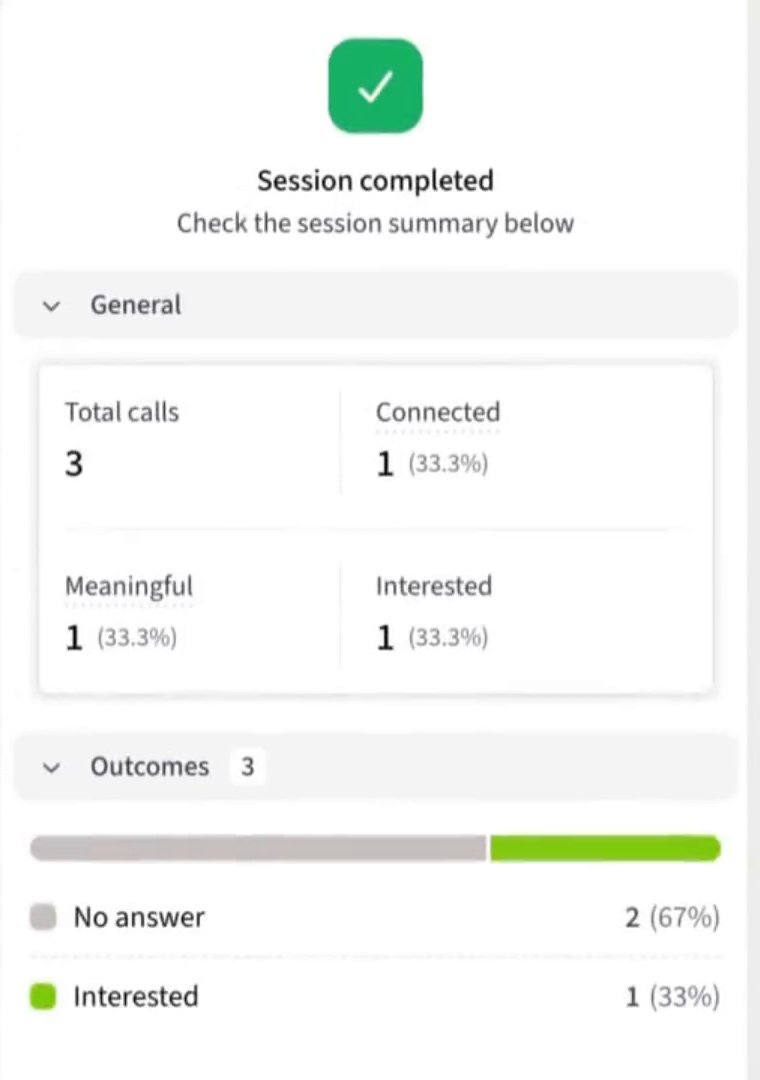
Read the session summary. When the block ends you get total calls, connected, meaningful and interested, plus the outcomes breakdown.
The session summary at the end of a calling block.
When should you run several lines, and when only one?
Amplemarket's dialer page puts the difference plainly: power dialing runs one line at a time so you can research the contact while the call connects, and parallel dialing runs several lines so you spend the block talking instead of waiting. Both use the same engine.
Several lines: first-touch calls into a well-filtered list, re-engagement calls on older leads, and any block where the main job is reaching people.
One line: late-stage deals, executives you have one shot with, callbacks someone asked for, and any account where you want two minutes of prep before the phone rings.
The mistake to avoid is treating every call the same. A parallel block works best when the list is already tight, which is why I pair it with good targeting upstream. Call steps also do more inside a multichannel sequence than on their own: Amplemarket reports a ~3x higher meeting rate when the Parallel Dialer runs as a multichannel step.
What makes it more than a dialer?
The calls live in one workflow before, during and after the conversation: verified phone numbers, call outcomes, follow-up and CRM activity in the same place. After the call you get transcripts, summaries, insights and coaching. For reach, verified phone data, Smart Rotation and Local Presence help reps call the right people from the right numbers while keeping those numbers healthy.
Per Amplemarket's Parallel Dialer page, teams see ~5x more calls, ~3x more meaningful conversations, ~75% less time dialing and 96.5% phone number accuracy. Those are Amplemarket's numbers. One customer put it this way:
"With Amplemarket's Parallel Dialer, I am spending less time dialing and reach far more people than I could with 1:1 calling." (an Amplemarket customer)
If calls are one piece of a bigger outbound build, the targeting, sequencing and handoffs around them are what we set up in our AI prospecting agent builds. For the platform overall, see our Amplemarket review.
Frequently asked questions
How many people does the Parallel Dialer call at once?
Up to 5. You choose how many lines to run from your call tasks.
What happens to the other calls when someone answers?
They stop automatically, and the contact page of the person who answered opens so you have context for the conversation.
Do reps have to deal with voicemails and no-answers?
No. Amplemarket detects voicemails and no-answers on each line and handles them, so reps only hear real people.
What is the difference between parallel dialing and power dialing?
Power dialing runs one line at a time so you can research the contact while the call connects. Parallel dialing runs several lines at once. Amplemarket uses the same engine for both.
Next step: book a demo or start a free trial with Amplemarket and run your first parallel calling block.
I'm an Amplemarket partner. Paid partnership with Amplemarket.