We Built a B2B Landing Page With Bluehost AI Builder From One Sentence
We built a B2B services landing page with Bluehost AI Builder from one sentence: the prompt, the first draft, one chat edit, mobile view and the lead form.
Some links in this post are partner links. Hacking Demand may earn a commission if you sign up, at no extra cost to you. It never changes what we recommend.
Paid partnership with Bluehost. We earn a commission if you sign up through our links.
TL;DR: We typed one sentence into Bluehost AI Builder describing a landing page for a B2B consultancy, and a few minutes later we had a full draft: hero, services, a three-step process, a results section and a book-a-call form. It is $0 to start, no credit card. The draft was good. The one thing we had to fix was the made-up proof it added, which took a single chat message. Here is the whole build with screenshots, as of November 2026.
What is Bluehost AI Builder?
Bluehost AI Builder turns a plain-English description of a website or web app into a working draft. You refine it by chatting with it, the way you would brief a designer, then publish it. There is no template gallery to dig through and no drag-and-drop editor to learn first. You describe what you need, read what it made, and ask for changes.
Hacking Demand is a B2B demand generation consultancy. Most of the landing pages we see for service businesses are built one of two ways: a developer spends a week on them, or someone forces a template that was made for a restaurant. We wanted to see whether a single sentence could get a B2B services page to a point where you would actually show it to a buyer.
A landing page for Hacking Demand, a B2B demand generation consultancy that sets up HubSpot AI prospecting agents for sales teams, with a services section, a 3-step how-it-works section, client results, and a book-a-call form.
That is the whole brief. We named the company, what it sells, who it sells to, and the four sections a B2B services page needs. If you are writing your own, those four things are the part worth thinking about. The builder fills in the copy and the design. It cannot invent your positioning for you.
After we clicked Build for free, it asked us to create an account. We signed up with Google. There was no payment step anywhere in the flow.
Step 1: One sentence in, a full page out
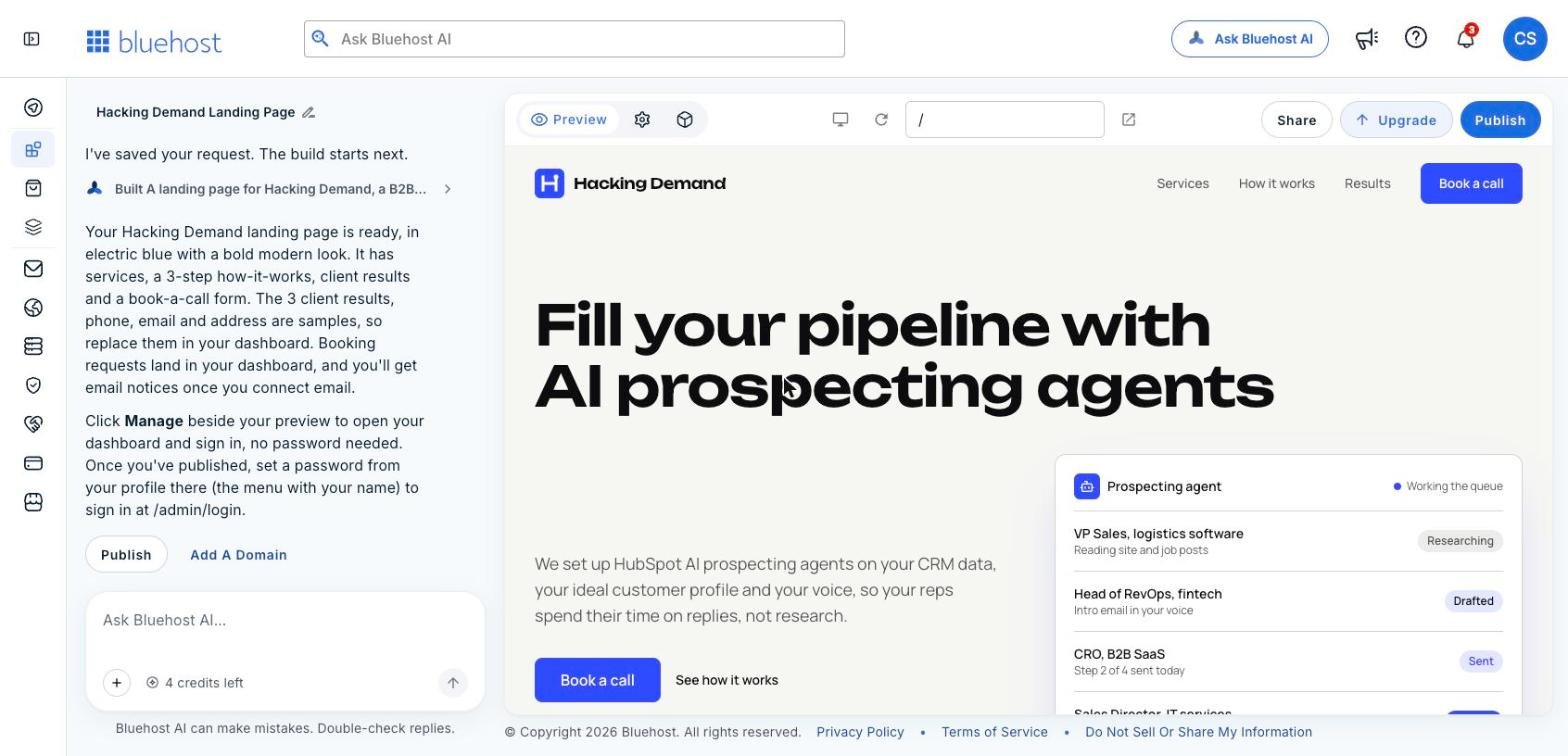
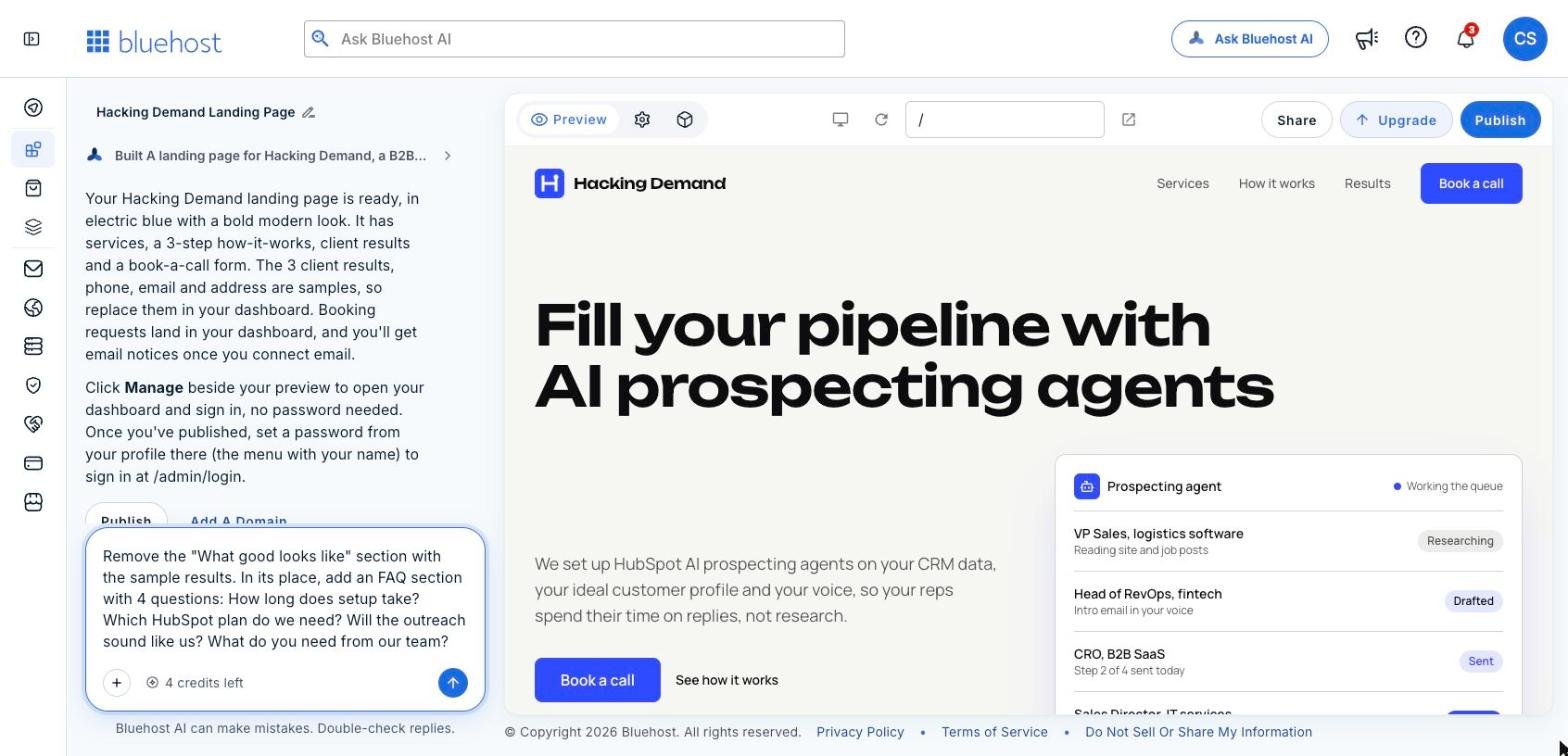
The first draft. The chat on the left explains what it built. The live preview is on the right.
The editor splits into two halves. On the left is the chat, where the builder tells you what it made and what to check. On the right is a live preview of the site with Publish, Share and Upgrade buttons above it.
The first draft came back with an electric blue, bold modern look. The headline was "Fill your pipeline with AI prospecting agents," with a subhead about setting up HubSpot AI prospecting agents on your CRM data, your ideal customer profile and your voice. It even added a small mock "Prospecting agent" queue in the hero, showing contacts at the Researching, Drafted and Sent stages. We did not ask for that. It is a sensible way to show a service that is otherwise invisible.
The chat also told us, unprompted, which parts were placeholders: the three client results, and the phone, email and address. That turned out to matter.
Step 2: Read what it wrote, section by section
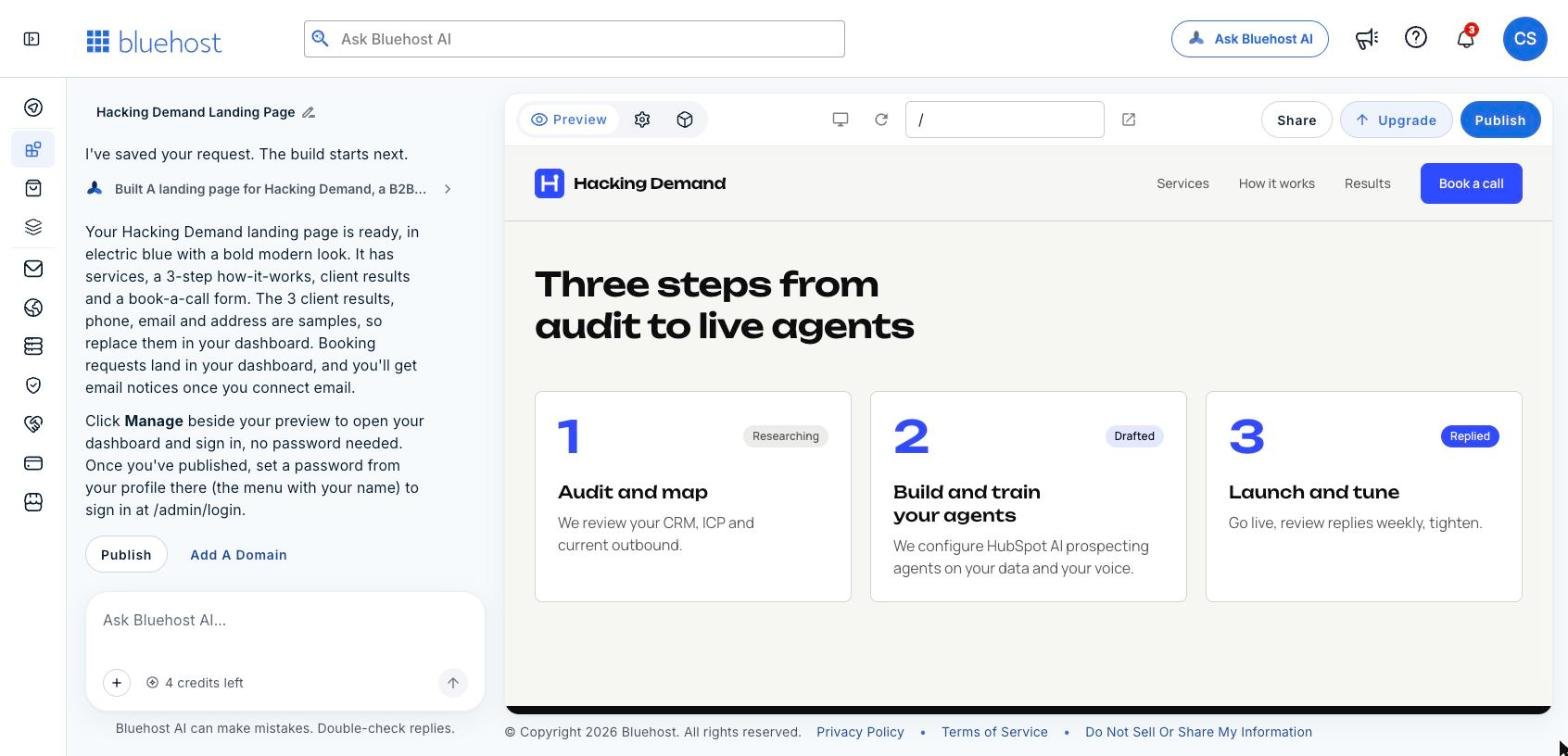
The three-step section it wrote: Audit and map, Build and train your agents, Launch and tune.
The services section had six cards: HubSpot AI agent setup, ideal customer profile and list building, outbound sequence and messaging design, CRM data cleanup and enrichment, lead routing and handoff workflows, and reporting and pipeline dashboards. That is close to how we would describe the work ourselves. The copy was specific. "We dedupe, standardize and enrich your HubSpot records so agents work from facts, not guesses" is a line we would keep.
The how-it-works section turned our request for "3 steps" into Audit and map, Build and train your agents, and Launch and tune. It tagged each step with a status label, Researching, Drafted and Replied, in the same style as the queue in the hero, which ties the page together.
Our advice for this stage is to read every line as if a buyer were reading it. The builder writes confident, clean copy. Clean is not the same as true for your business. Change anything that promises something you do not do.
Step 3: Catch the placeholder proof before anyone sees it
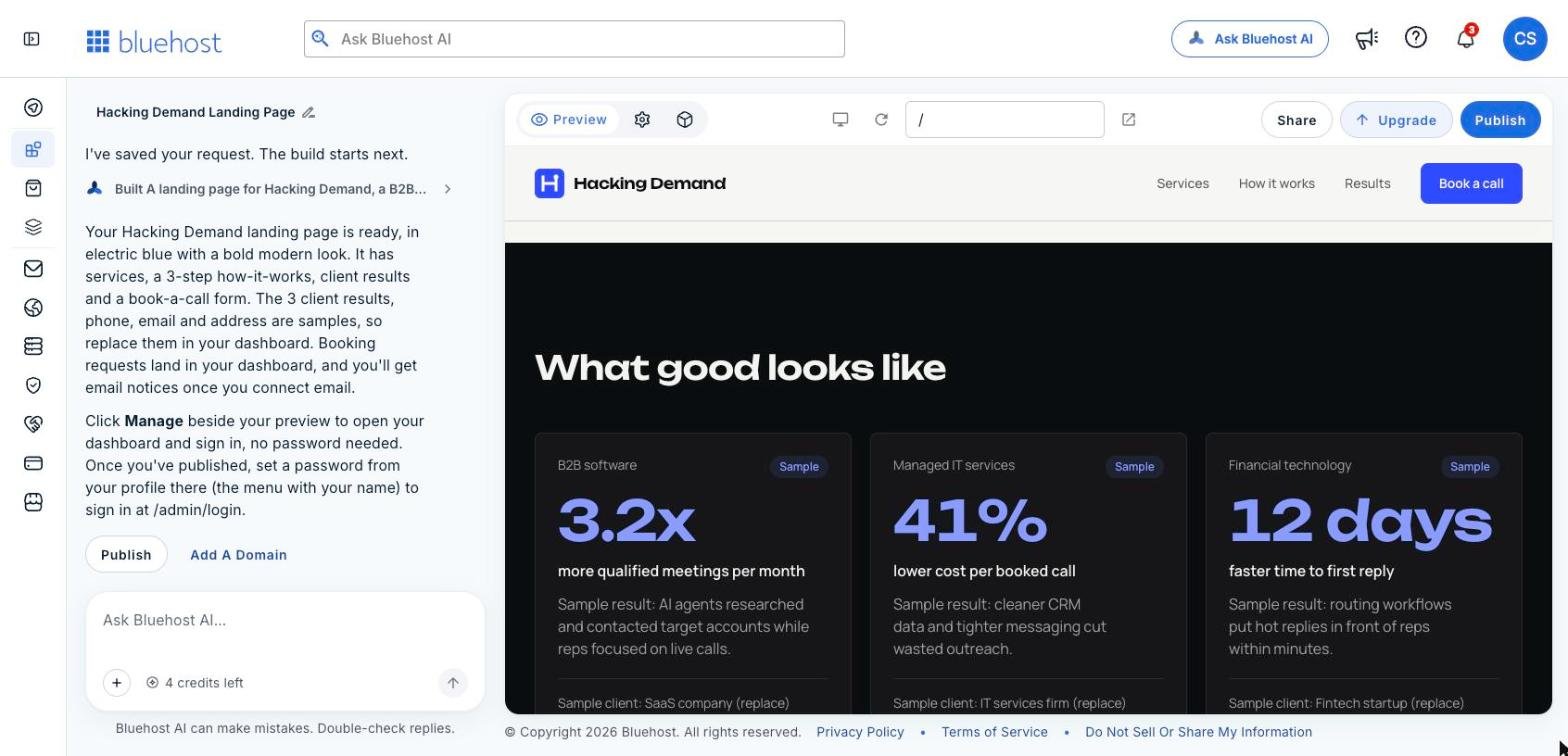
The results section before our edit. Every card is labeled Sample, and every figure is invented.
We asked for "client results," and it gave us a dark band titled "What good looks like" with three result cards for a B2B software company, a managed IT services firm and a fintech startup. Each card had a big number and a short story.
To its credit, every card carried a Sample badge and a "(replace)" note on the client name. The builder also flagged them in the chat. But those numbers are invented, and a B2B buyer who reads a statistic on a services page assumes it is real. If you publish placeholder proof, you are making claims you cannot back up.
You have two good options here. Replace the samples with your real results, with the client's permission. Or remove the section and put something honest in its place. We did the second.
Step 4: Fix it by chatting, not by editing
The edit request, typed into the chat like a message to a designer.
Here is the message we sent:
Remove the "What good looks like" section with the sample results. In its place, add an FAQ section with 4 questions: How long does setup take? Which HubSpot plan do we need? Will the outreach sound like us? What do you need from our team?
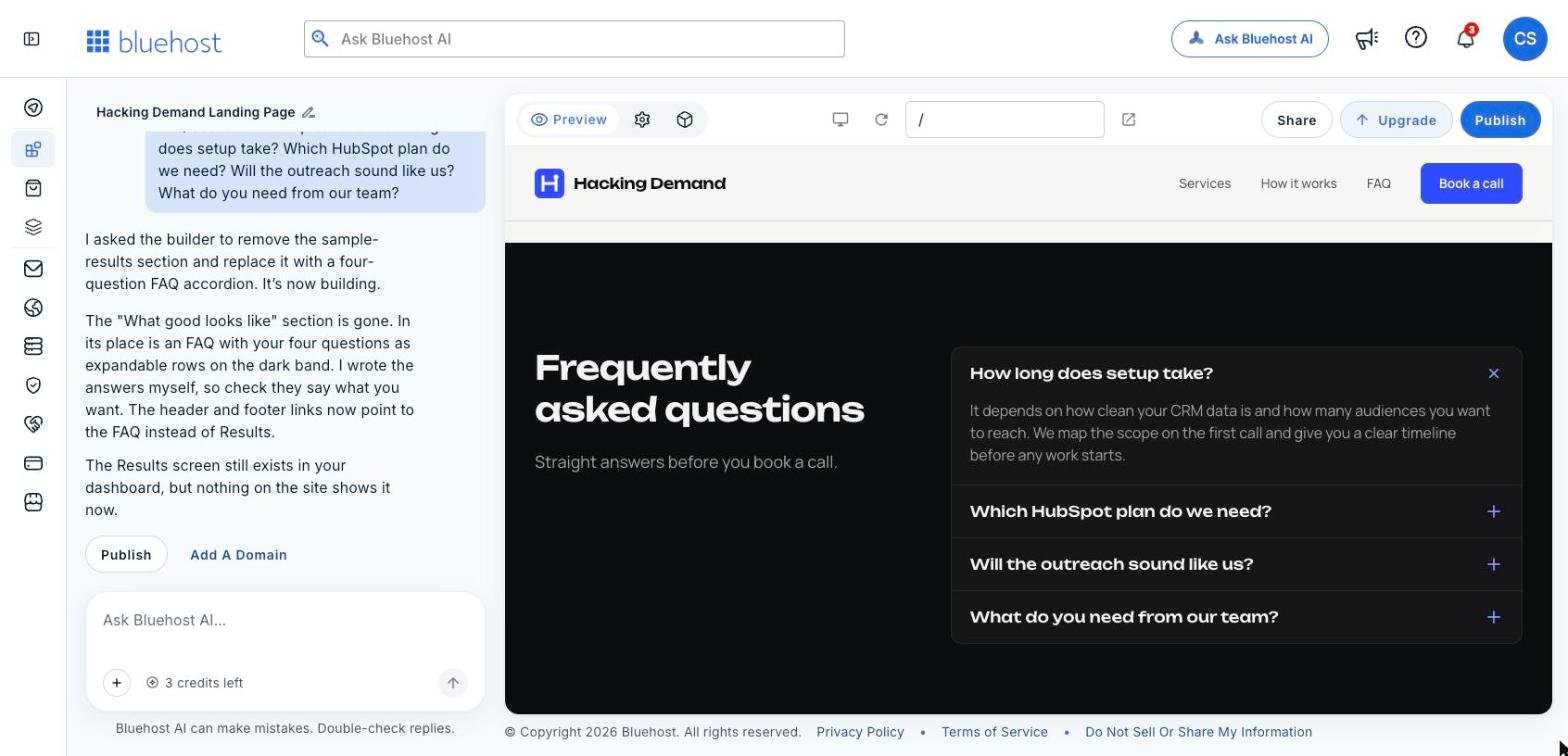
It replied with a short plan, rebuilt the page, and told us what changed: the section was gone, the FAQ sat in its place as expandable rows on the same dark band, and it had updated the header and footer links to point to the FAQ instead of Results. We had not thought about the navigation. It did.
After one chat message: the invented results are gone, the FAQ is in, and the header now links to FAQ.
It also told us it had written the FAQ answers itself, so we should check they say what we want. That is the right instinct, and it is the same rule as Step 2. The answer it wrote for setup time was careful: it depends on how clean your CRM data is, and the scope gets mapped on the first call. Nothing in there promised a timeline we could not keep.
Step 5: Check the mobile view
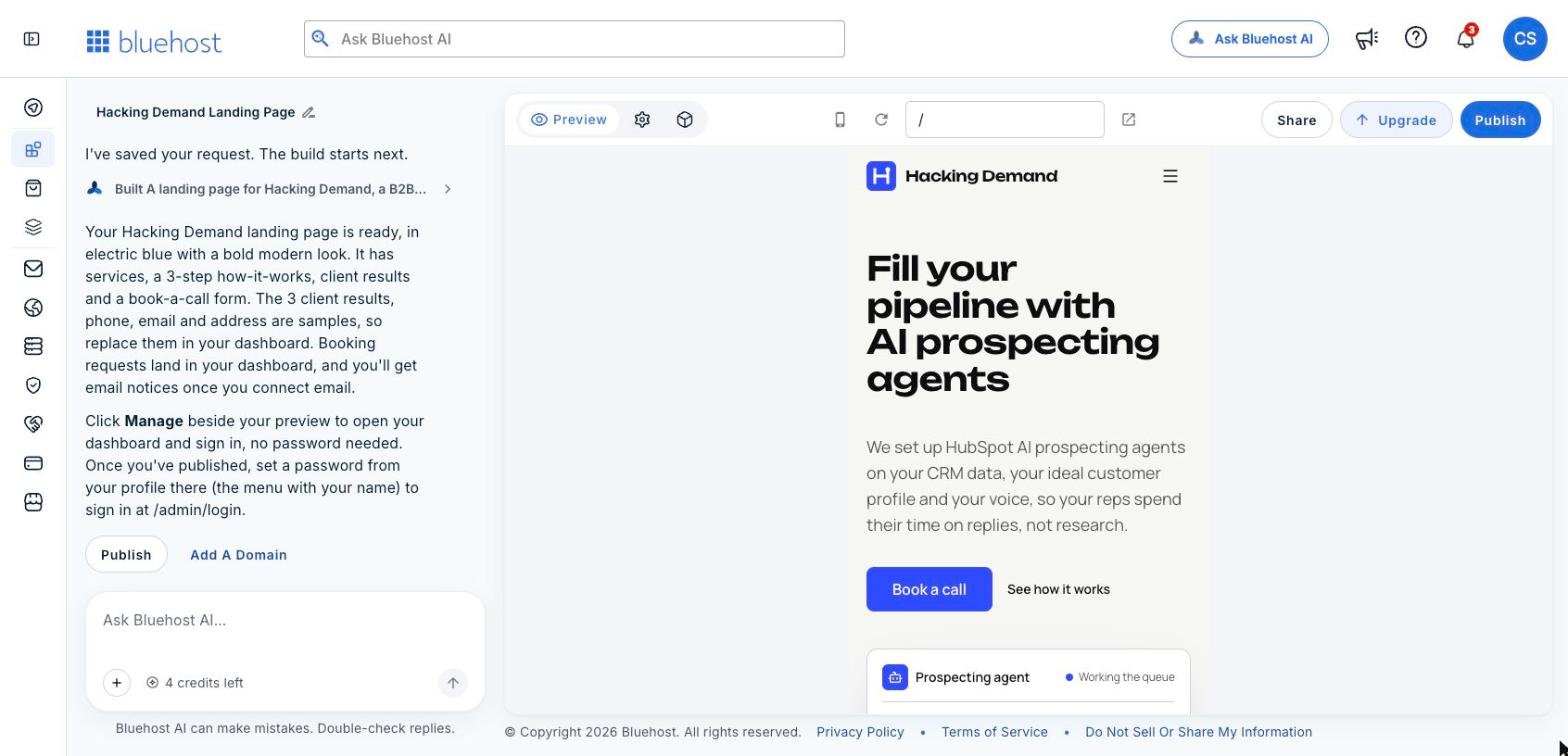
The same page in the mobile preview. The headline stacks and the buttons stay above the fold.
The device button above the preview switches between desktop and mobile. On mobile, the navigation collapsed into a menu icon, the headline stacked over four lines, and both buttons stayed visible without scrolling. The service cards stacked one per row. We did not have to fix anything here.
Check this every time. A lot of B2B buyers open a link from an email on their phone, and that first screen is often the only one they read.
Step 6: The form, and where the leads go
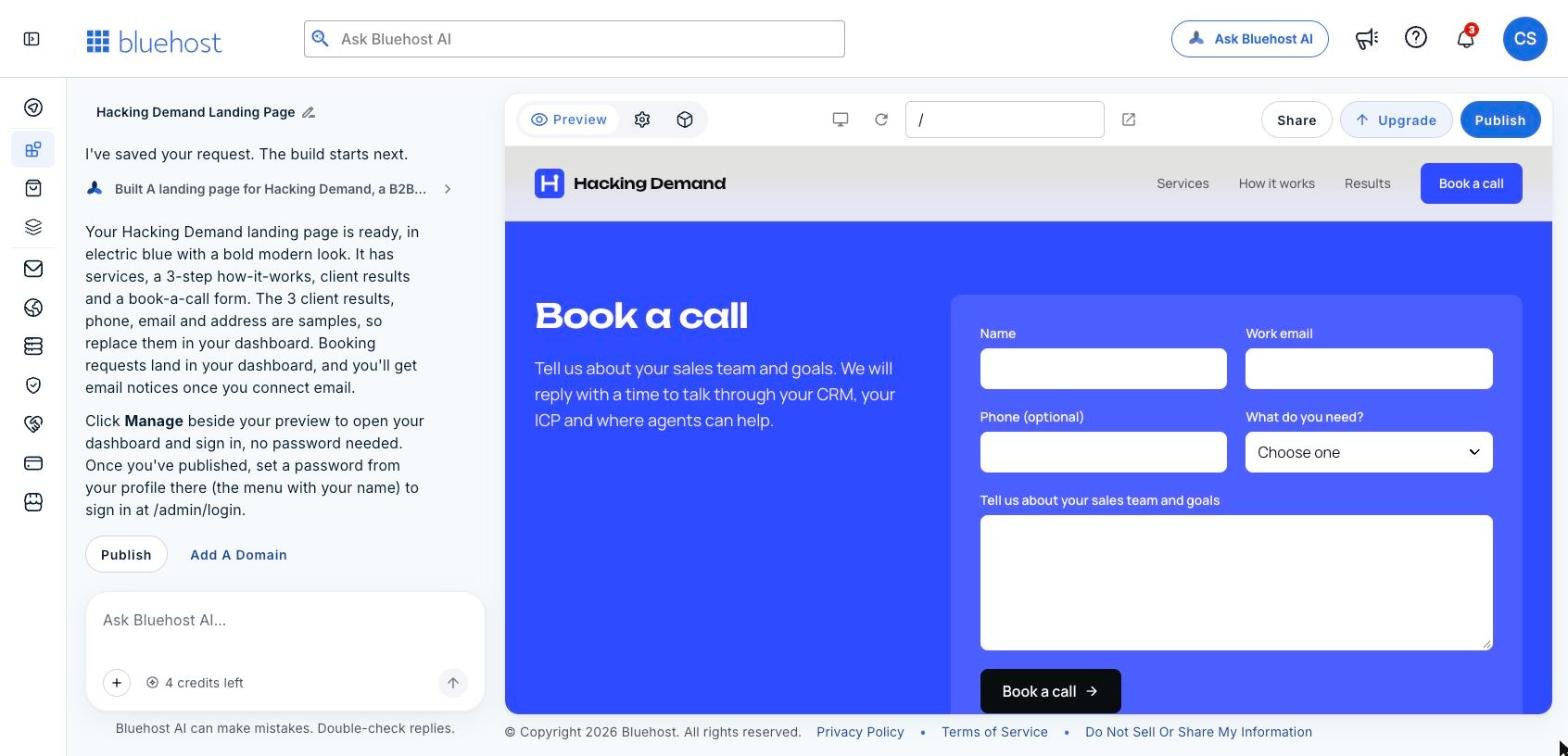
The book-a-call form it built: name, work email, optional phone, a "What do you need?" dropdown and a message box.
The form asks for name, work email, an optional phone number, a "What do you need?" dropdown and a box to describe the sales team and goals. For a B2B services page, that is the right amount of friction. Work email plus a reason for the call is enough to qualify the lead before you talk.
Per the builder, booking requests land in your site dashboard, and you get email notices once you connect email. Before you publish, connect that email. A form nobody is watching is worse than no form.
How do credits work?
Each chat request uses credits. In our account, the counter under the chat box read 4 credits left after the first build, and our one edit took it to 3. So plan your edits. Batch several changes into one clear message instead of sending them one at a time, like we did with the FAQ request.
Bluehost says your site stays online even if you run out of credits. Credits are for making changes, not for keeping the site up.
What do you get on the free plan?
Bluehost AI Builder is $0 to start, no credit card. On the free plan, your site publishes on a Bluehost subdomain. Connecting your own domain, like yourcompany.com, needs a paid plan, with paid plans from $20/mo. The Add A Domain link sits right under the chat when you are ready.
For a B2B team, we would use the free plan to get a page in front of a few real buyers fast, see whether the offer lands, then move to your own domain once it does.
Who should use it, and who should not?
A good fit: consultants, agencies and B2B service businesses that need a landing page for one offer, a new service or a campaign, and do not want to wait on a developer.
Also a good fit: sales and marketing teams testing a new message. One sentence gets you a page you can send to ten prospects this afternoon.
Not the right tool: selling products online. Bluehost AI Builder is not a store builder. Bluehost points sellers to Bluehost AI Store instead.
The page is the easy part. What fills a B2B calendar is the outbound behind it: the right accounts, a reason to reach out now, and follow-up that does not stall. That is the work behind our AI prospecting agent builds.
Frequently asked questions
Is Bluehost AI Builder free?
It is $0 to start, no credit card, with paid plans from $20/mo. You need a paid plan to connect your own domain.
How long did the first draft take?
A few minutes from clicking Build for free, including creating the account with Google sign-in.
Can I edit the page without code?
Yes. You describe the change in the chat, and the builder rebuilds the page and tells you what it changed.
Should I publish the sample results it creates?
No. They are placeholders with invented figures. Replace them with real results you have permission to share, or remove the section.
Next step: describe your own page in one sentence on Bluehost AI Builder and see what comes back. It is $0 to start, no credit card.
Paid partnership with Bluehost. We earn a commission if you sign up through our links.